My main focus has been in taking OVF content from other vendors and consuming that with Citrix Kensho (the OVF Tool or XenConvert 2.x) – however lets turn the tables.
OVF is a format that describes virtual appliances; these could be single or multiple machine. In doing so, OVF describes the virtual hardware and physical requirements of each machine.
In the spirit of supporting the development of interoperability between vendors I also consider how other vendors consume OVF appliances.
I have my personal opinion of how things should work, but the DMTF VMAN is a committee, therefore there are many opinions.
At the same time, the promise of interoperability is as much in the hand of the consume of an appliance as it is in the creator, as it is in the operating system of the machine in the appliance.
Lets look at using VMware Products (as released today 10/9/2009) to consume a Citrix Kensho created OVF appliance.
Well, I am going to be honest – at this time VMware does not translate other vendors hardware descriptions into VMware equivalents – therefore VMware cannot import OVF content that does not adhere to the VMware way of describing the hardware of a virtual machine.
So, knowing that, is there a workaround? Yes, there is.
In my example I am going to use XenConvert to create an OVF Appliance from a XenServer XVA (that is an export of a XenServer VM), modify that using a VMware created OVF, and then import to ESX.
Mind you, this is not for the easily sickened, nor is it something you want to do every day.
First of all, I begin by downloading the Citrix Merchandising Server virtual appliance. I also use XML Notepad, ESX, and VMware Converter. (Please note that following this process will NOT magically make the Merchandising Server work on ESX - you need to use the appliance built for VMware)
[1] Expand the Merchandizing bz2 zip archive. (WinRAR can do this, and others as well)
[2] Use Citrix XenConvert 2.x to convert from “
Xen Virtual Appliance” to “
Open Virtualization Format (OVF) Package”
Do not create an OVA, just an OVF.
[3] Using the VMware Client:
a. Create a shell VM using Linux / RedHat Enterprise Linux 5 (32-bit)
b. Select the VM that was created and export it to an OVF appliance
· VI3 = Select VM, File, Virtual Appliance, Export
· vSphere4 = Select VM, Export
[4] Open both folders containing the OVF appliance from XenConvert and the OVF appliance from VMware.
Note that both folders contain common items: a virtual disk file, and a .ovf metafile that describes the settings of the appliance.
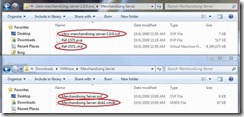
[5] Copy the VHD from the XenConvert created appliance to the folder of the VMware created appliance

[6] Open the .ovf XML metafile from both appliances using XML Notepad
[7] Open the two references to the virtual disk
There are two important sections that need to be modified in the VMware OVF so that it will properly ‘see’ the VHD. The ‘name’ of the virtual disk and the ‘format’.
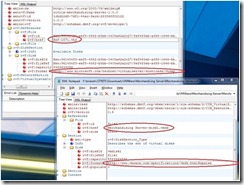
[8] Copy the disk reference sections from the XenConvert created appliance to the VMware created appliance.
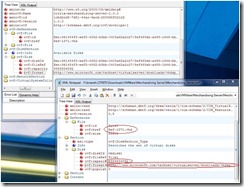
[9] Save the changes
[10]If the VMware appliance folder contains a file ending in .mf – delete it
[11]Using VMware Converter import the modified VMware OVF appliance.
Only VMware Converter can both consume the OVF and convert the VHD to VMDK.
a. Open VMware Converter
b. Select Convert Machine
c. Choose virtual appliance, browse to the modified OVF
d. Select Next
e. Complete the import wizard
The preceding steps converted the Merchandising Server XVA based appliance to OVF and then used a VMware derived OVF to import the appliance to VMware. The operating system within the appliance still needs to be repaired to allow the machine to boot and run.
Hopefully, I will have a solution for that in the near future. As there are currently many challenges inherent within the operating system of the machines themselves that prevent true interoperability.


