Showing posts with label snapshot concepts. Show all posts

Tuesday, May 15, 2012

Estimating space for Hyper-V snapshots

A forum post inspired me to not directly answer a question this morning, but rather explain something so that folks can think about it instead.

The original post asked the following:

3 nodes Windows server 2008 R2
I have 3 nodes Hyper-V Cluster CSV in fiber channel with a multiple volumes.
1.What the amount of free space, I should keep the volume csv not to fail for lack of space.
2. Can I create a new volume and configure snapshots to be saved only in this new volume?
3. What is the recommended size for the other volume to store the snapshots.

I see two ways to answer this -

  1. directly answer question #2 and wait for the individual to fail
  2. Attempt to answer #1 and #3 (which estimation here is nearly impossible – due to chaos and randomness).

I jumped straight to a description of the technology – which I have not blogged about for some time, but it just seems to linger.

Here is my response:

You as asking questions about how to size a snapshot volume as if you have a background with ESX / VMware.

A snapshot is a moment in time - a differencing disk and configuration. Not a location where copies of VMs are saved off to.

The disk portion of a snapshot uses a differencing disk. Each differencing disk has the potential to grow to the full size of its parent. If its parent is a fixed disk, it will get that big - if it is a dynamic disk it can reach the maximum.

So, in theory - one snapshot can double the amount of storage required for a VM.

Also, a snapshot location is a runtime location. Where the snapshot is located is where the VM is now running from - until that snapshots is deleted and the snapshot is merged back in.

Knowing this, don't plan on using a slower or different class of storage - unless you are very specific and consistent about how you use snapshots and take this into consideration.

By default snapshots are in the same location as the VHD (and as the VM) - Hyper-V (the product) implemented this model with the R2 release because folks were getting into all kinds of trouble by separating the VM snapshots from configuration from VHD and when it came time to upgrade storage or migrate the VMs wound up broken.

So, you can separate the locations, but you need to be clear on how that benefits you. It is more about your process and procedure than the technology.

You might find this useful: http://itproctology.blogspot.com/search?q=snapshot

On a side note:

There is a growing swell in the Hyper-V forums of questions where folks just want to do something but are not taking the time to understand the implementation, they just push on and have problems.  Back in the day we used to refer to this as RTFM.  But you can’t say that in a forum.  But I plead with you, read the manual.

Wednesday, April 29, 2009

MSFT finally talks snapshots in detail

Finally, after a long time of answering forums posts and my own posts here.

Ben Armstrong (or VirtualPC Guy fame) has posted a series of articles regarding snapshots and snapshot behavior.

Please, read and enjoy.  These are not going away any time soon.

Where are my snapshot files?

http://blogs.msdn.com/virtual_pc_guy/archive/2009/04/13/where-are-my-snapshot-files-hyper-v.aspx

What happens when I delete a snapshot?

http://blogs.msdn.com/virtual_pc_guy/archive/2009/04/15/what-happens-when-i-delete-a-snapshot-hyper-v.aspx

What happens when a snapshot is being merged?

http://blogs.msdn.com/virtual_pc_guy/archive/2009/04/16/what-happens-when-a-snapshot-is-being-merged-hyper-v.aspx

Why does it take so long to delete a virtual machine with snapshots?

http://blogs.msdn.com/virtual_pc_guy/archive/2009/04/20/why-does-it-take-so-long-to-delete-a-virtual-machine-with-snapshots-hyper-v.aspx

What happens if I start a virtual machine that is merging snapshot files?

http://blogs.msdn.com/virtual_pc_guy/archive/2009/04/21/what-happens-if-i-start-a-virtual-machine-that-is-merging-snapshot-files-hyper-v.aspx

Should virtual machine snapshots be used in production?

http://blogs.msdn.com/virtual_pc_guy/archive/2009/04/23/should-virtual-machine-snapshots-be-used-in-production-hyper-v.aspx

Thursday, July 17, 2008

Managing Hyper-V snapshots - the basics

This came out of a blog comment that I thought needed some attention. Really basic; “what happens” type of stuff.

(Although, I truely feel that a little time exploring the user interface and anyone could figure this out on their own.)

I have written about snapshots quite a bit as Hyper-V snapshots are a new thing for most folks.

Not that a snapshot is new (or a checkpoint for those of you using SCVMM), but the way that Hyper-V does it is definitely different.

You can find those previous posts here, here, and here.

Anytime you think Hyper-V snapshots, always remember that the integrity of the timeline must be maintained. That is key to grokking the concept.

Now, let’s begin.

First of all, you can create a snapshot ( wow, amazing stuff ). This creates a differencing disk that reverences your base VHD, thus you always have that base VHD to return to, and saves your current memory status (if your VM was running).


Second, you can Apply a snapshot. This takes me back to the point in time that is represented by the snapshot I selected. It does this by the same process as above, it creates a differencing disk and attaches it to the VHD that is referenced by the snapshot.


Okay, if I am losing you – you need to back up and read the posts I referenced above.


For the next couple you need to think about trees and the branching of a tree structure. The simplest way to show this is a single picture of an expanded tree (visual aids are always good).


Third, I can delete a single snapshot. This deletes the moment in time that a snapshot represents, its differencing disk and any saved memory state. If a snapshot is ‘below’ this one on the subtree, then its reference pointers are modified to reference the proper snapshot ‘above’ it.
In this example I deleted Snapshot B.1

There are other things happening here as well. To maintain integrity of the snapshot timeline the differencing disks need to be merged. This happens in the background when a VM is powered off and I will save the gritty details for another post.

Fourth, I can delete a snapshot subtree. This deletes the moment in time that a snapshot represents and any other snapshots that are ‘below’ it in the tree. Thus it does what a delete does, but without selecting individual snapshots, it takes an entire branch. Yes, we get a merge, not a revert as I mistakenly put in my graphic.

Now, to get started on the really complicated post..what happens under the hood.

I have alluded to this before with the instructions about how to manually merge VHDs. Maybe I need to back up even more and talk about differencing disks...hmm..

Friday, March 7, 2008

Snapshotting in Hyper-V does not equal VMware checkpointing.

The snapshotting concept under Hyper-V

For all of you familiar with ESX server and Virtual Center (or using a 3rd party product to do backups using checkpoints) you will have to think about things a little differently.

First of all.
Is using Hyper-V snapshots a good method to backup your VMs?

Answer: No. It isn't a backup method at all. It provides the ability to return to a defined point in time in the life of your VM. It is a very useful tool for testing application upgrades and service packs.

What are snapshots then (if they aren’t the same as a checkpoint)?

The best way that I have been able to describe snapshots is by using a timeline or traveling in time.
A snapshot is a moment in time that you can return to. And going right along with that - you can freely move forward in time, but moving backward in time will alter your future.

"Don't alter the timeline" - we have heard it hundreds of times (especially if you watch Star Trek Enterprise). Well, then you also hear the Vulcans state that time travel is impossible..

Snapshots in Hyper-V are all linked together, a single snapshot cannot stand alone (at least not without doing some tricks) as it is linked to its parent and so on.

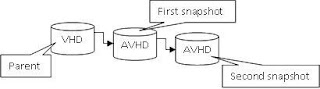
The concept looks like this:

You begin with a base VHD. When a snapshot is taken an AVHD disk is created and the configuration of the VM is updated to use the AVHD as the current virtual hard disk.
(An AVHD is a snapshot specific differencing disk that is being used as the running point of a VM)

The AVHD disk is now the point where all system changes are written from this time forward - the base VHD is no longer being modified. And the AVHD is linked to (dependent upon) its parent disk. If you were to move one of these two files the VM is broken.

You can continue to spawn off additional snapshots. Each snapshot is linked to its parent in a linear (timeline) arrangement. They cannot link in a branched tree arrangement because that would create dead branches.

When you go back to a previous point in time (return to a snapshot) everything to the right of that point in time is destroyed (rendered unusable) because you altered the VM at a previous point.


Managing snapshots
Okay, what can I do with snapshots besides take them?

You can select a shapshot for a VM and “apply” it or “revert” to it.
This takes you to that moment in time and begins running the VM at that point in time. (You begin using the AVHD file that was created at that point in time).
“Revert” takes you back one step while “apply” can take you back many snapshots in one step.

Deleting a snapshot removes it from the tree.

You might wonder “if all of the snapshots are linked together how can I delete a snapshot out of the middle?”

This is because in the background Hyper-V is maintaining the integrity of your VM by combining the various states of your VM (or flattening the structure of your differencing disk timeline). If this didn’t happen your entire VM would be broken – that would be a serious bummer.

The merge process happens quietly in the background when a VM is powered off.
That is an important thing to remember – the VM must be powered off for all of the disks to be merged together.
This counts for anytime that snapshots are modified or merged into the Parent.

Delete a snapshot and its subtree.
This process deletes a snapshot and any other snapshots that are to the right of it in the timeline. The result is just that any snapshots taken to the right of the point in your timeline that you elected to perform this operation are all committed and merged into your current snapshot.

What if you want to “flatten” your tree and have everything written back to the base VHD?
Delete each of your snapshots one by one, even the current running one, and wait for the changes to be merged back into your base VHD. This can take a long time, and the VM needs to be powered down.

Deleting snapshots does not move you back in time, only applying a snapshot does that. Deleting snapshots merges your changes into another disk within the timeline.

Oh, and why don’t I have a bunch of screenshots of the GUI?
Because I figure that most Server Admins are smart enough to handle a GUI ;-)