Showing posts with label architecture. Show all posts

Tuesday, November 6, 2012

Paravirtulization under the hood and more

For those of you that are hard core virtualization folks, there is an excellent couple of articles over at xen.org by George Dunlap from Citrix.

In the ESX world and Hyper-V world the virtualization is closer to the HVM type or PVHVM when the OS is enlightened.  Xen has grown from a different root and started from the paravirutalization world (true PV, it is actually kind of interesting how the VMs themselves boot in this world).

This also gives a bit of background into the terminology and options that are available.

There is a part 1: http://blog.xen.org/index.php/2012/10/23/the-paravirtualization-spectrum-part-1-the-ends-of-the-spectrum/

and part 2: http://blog.xen.org/index.php/2012/10/31/the-paravirtualization-spectrum-part-2-from-poles-to-a-spectrum/

Personally, I think it good reading for anyone working with machines as it is a history of evolution in one aspect.

At this same time we have MSFT Research working on the Library OS.  This is an interesting abstraction of applications into VM type containers, application containers.  This is more similar to the traditional Xen PV model, where (technically) there isn’t a boot kernel in there, just the runtime components of the machine and the bootstrap comes from the xen hypervisor itself.  (at least that is my impression of it).

The MSFT research project known as Drawbridge: http://research.microsoft.com/en-us/projects/drawbridge/

And a bit more: http://research.microsoft.com/apps/pubs/default.aspx?id=141071

And a Channel9 presentation for the short attention spans among us:  http://channel9.msdn.com/Shows/Going+Deep/Drawbridge-An-Experimental-Library-Operating-System

Other MSFT Research OS projects: http://research.microsoft.com/en-us/groups/os/

Is this the future?  the Application level virtualization that was discussed many years ago.  Decoupling the application from the OS?  Not really the decoupling, but the forcing of an application into a container.  A container that it cannot get out of and affect other applications.

I look at this and think about traditional application compatibility issues going away, true application throttling, true isolation of a session (and its applications) within a Terminal Server.  That is what really makes me think about where this is all headed.  And we continue to be just at the beginning of it all.

Friday, December 24, 2010

Fabric is infrastructure

Azure is this platform. It is a bunch of VMs but it isn't a bunch of VMs. There are roles and instance of roles (which are technically VMs).

Then there is this mysterious thing called 'fabric'. The fabric is the secret sauce, it is the thing that makes it all work.

For those of us who have been in enterprise IT - we know all about fabric. We have built it, we have managed it, we have fixed it.

This is a term that is not Azure specific by the way - you will see it appearing in more and more places - fabric is infrastructure. Azure fabric is a bit more - but you will be seeing this fabric term more frequently in the future.

In the simplest sense, fabric is infrastructure. It is the server, the hypervisor that runs on it. It is the storage and storage management. It is the network; the load balancers, the subnet, the VLANs. It is also the management layer that brings all of these things together.

It is this management layer that provides the real keys - the orchestration of events. Provisioning of storage, a VM on a hypervisor, booting that VM, configuring its firewall and networking, installing / instantiating / injecting / inserting / configuring the application, setting the virtual interfaces of the load balancers, and verifying the "health" of your application.

All of this is what the fabric does and it is really valuable, important, and useful.

If you want to geek out (in an IT Pro sort of way) and want to learn more - here are some presentations by Mark Russinovich describing the entire thing in deep detail at PCD 2010

http://player.microsoftpdc.com/Session/18a38105-520f-486a-9e04-d956736e506d

Friday, May 7, 2010

OVF vs OVA the saga continues

It has been over two years since I began working with the OVF standard from the DMTF.

Repeatedly during this process I have had to educate folks about what an OVF package is, and quite frequently what an OVA is and when to use it.  Just yesterday I corrected a person in a conference call as this is still a relatively new thing to most folks.

In very simple terms, an OVA is a single file.  It is a TAR archive of an OVF.  It simply has the file extension “.ova” to give some indication that it is an OVF.  Otherwise it would be just any other “.tar”

The OVF is the real important part that the DMTF keeps defining and expanding upon.

The OVF package is basically two things. 

  1. It is an XML file that describes the virtual environment (vCPU, vRAM, vNetwork config, and it lists references to any other parts of the OVF package).
  2. It is a collection of files.  Virtual disks of virtual machines, .ISO installation media, any other file attachments that a person could dream up.

Use OVA when you need to take an OVF package somewhere.  Or want to give it to someone as a download.

Use an OVF for all of your internal purposes.

Is OVF a promise that an appliance can be imported to and run on any hypervisor?  Absolutely not.

OVF is NOT a way to convert workload from one platform to another – no reason why it could not be used that way (it makes sense) – but that is not why it exists.  Eventually I see companies implement conversions around OVF packages.  The closest thing I know of today is the “fixup” that is in the Citrix Kensho implementation.

There are two reasons why:  The OS installed in the VM and its built in driver support and that different hypervisors present virtual hardware in different ways. 

To a lesser extent there is a third reason: proprietary VM tools.  The tools from vendor A can prevent a VM from running on a different hypervisor (or at least make it really difficult) or they can cause the performance of the VM to be very poor on the new hypervisor.

So, the moral of the story:  Use OVA appropriately and don’t expect an OVF package build on one hypervisor to “just work” on a different hypervisor.  And be wary of VM tools installed within the VM.

Friday, January 1, 2010

IT needs a language

I constantly struggle with writing documentation and also communicating concepts to many IT folks in writing. 

This is one of the reasons that has driven me to producing videos and capture sessions over the past couple years (I can say far more, more accurately with combined speech and visuals than attempt to accurately convey in writing).

My work as a moderator of the Hyper-V TechNet forum also speaks to this.  I spend a great deal of time describing concepts in forum posts – that end up being incredibly long.  Each time I write it a bit differently, still trying to convey a concept.

The reason for this post?  Accuracy.  Accurate conveyance of information.

This all started with a recent trip to the doctor.  20 minutes of discussing things with my doctor was summarized into a single paragraph of Latin.  The use of the common language of Latin to describe symptoms, and convey that description from doctor to doctor.

I am not proposing that Latin be revived in IT.  However, to use commonly understood grammatical structure to describe concepts, or installations, or topology, or systems architecture.

This gets even more complex as we move into the virtual workload world.  Where we describe physical characteristics in a non-physical way.

A virtual appliance for example.  In its most common representation today, this is a virtual machine – installed within that virtual machine is an operating system and some application.  The application and OS have dependencies – DNS, networking, Active Directory authentication for example.  The machine has dependencies – two virtual NICs, one public facing, one that faces a private subnet that connects to the database server.  Oh, and now we have an external entity of a database server.  Where does it all end – I don’t know of a single workload that exists in an enterprise as a single entity.

The struggle is:  How do we describe this in a universal way so that no matter where you take that appliance the environment knows what to do with it?  How to configure it.  How to connect it.  Where to connect it.

This is the role of a Standards Body – in this case the DMTF is attempting to build this common term framework.  But this is a framework, it is not universal terms – it is simply items or entities.  So at least we begin with common items – however describing them in different languages by vendor.

Now, how do I take that DMTF developed structure and tern it into words.  One set of words that can be used in association with a NIC to describe its network connection and then the attachment and VPN attributes.

Or, throw that idea out the window and focus on describing the interactions between the workloads only.  Don’t describe the physical topology in any way – simply describe the dependencies between workloads or appliance entities.

Most IT folks would never see this description language – but integrators would find it useful, documentation folks would find it useful, and even developers would find it useful.

Tuesday, December 22, 2009

Hypervisor virtualization basics a visual representation

For all of you that want a place to point folks to describe the basics of virtualization, I have put together a few videos to describe the hypervisor, CPU, and network concepts in a visual way.

The intent is to give a quick amount of conceptual information to those folks that suddenly are dealing with VMs, but might not have the experience to fully understand what they are looking at.

Hypervisor Basics:

The basics of what a full (type 1) hypervisor is.


The hypervisor pool of resources – the CPU:

The basics of CPU scheduling. It is far more complex than this and there are many methods.  It gets really messy when hyper-threading is introduced.

More CPU scheduling details are over at the Xen.org site (the Xen folks are more open in discussing the gritty details of all this):  http://wiki.xen.org/xenwiki/CreditScheduler

The hypervisor pool of resource – the network:

This is about virtual networks / virtual switches / bridging.  The concepts, as each vendor implementation offers different features.

Tuesday, June 9, 2009

The hypervisor processor is not being utilized

Recently, I have answered this question in the forums quite a bit.

The basic situation is:  the processor within a virtual machine is running at 100%, but the host processors at sitting there, twiddling their thumbs and only using 5% (for example).

The next response that I usually see is:  How can I tweak this all about to make that more the way I see things happening when not running in a VM.

First of all, stop there.  Type I hypervisors (XenServer, ESX, Hyper-V, VirtualBox, etc.) all have to manage the pool of physical resources.  It is all about isolating, containerizing, containing, and sharing the physical resources.

If a guest goes 100% on a processor the host should not go 100% on a processor.

The Type I is a full hypervisor, therefore all physical processors have been virtualized and the hypervisor migrates processes between the processors to balance out the load.

This is to maintain the integrity of the entire virtual environment and to prevent a single VM from hogging the entire system.
What you see with Hyper-V you should see with ESX, or XenServer, or Virtual Iron, etc.

You will se different results with VirtualPC, Virtual Server, VMware Server - because they are not full hypervisors - they are hosted virtualization solutions and share in the physical resources in a different way.

Here is a scenario:  What if the VM processor utilization was dynamic, it is allowed to take more from the host as it needs it.

If the amount of processing power given to a VM was dynamic.  In that if the VM spikes, then a host processor spikes.
As soon as you have more than one VM, all the other VMs now lose.

And, if a second VM does this same thing, now the remaining VM lose even more.

In the mean time, the poorly written application that is causing the processor spiking in the first place is taking resources from all the other users that are sharing in the pool of physical resources, for no good reason.  He is just being a hog.

Also, that operating system that you login to at the console, think of that as a VM as well.  He also has to share in the pool of physical resources.  So, if a single VM is allowed to spike a physical processor, then the Host itself also loses and it not able to respond to all the other VMs that run on the host including the hog VM.

For there it is just a downward spiral into the depths of an impending crash of the entire host and all of the VMs.
this is the hypervisor model.  All machines running on the hypervisor must share (play nice) with each other, or everyone loses.

So each machine is placed into a container, and that container is bounded.

These bounds can be modified on a VM by VM basis.  And if you have a single host only running a couple VMs, then playing with these settings generally does no harm.  As soon as you scale and add more and more VMs, this tweaking gets out of hand very quickly.

You tweak VM A in a positive way, which in turn has a negative impact on VM B and C.  So you compensate and tweak VM B and C which in turn has an impact on VM A again.  And you end up tweaking the environment to death.

The recommendation from all hypervisor vendors is to not mess with the default settings unless absolutely necessary.  And if you do, document it very well.

Now, if you have a single VM that is miss-behaving, then you need to dive into that particular VM (just like a physical server) to determine why he is processor spiking.  Is it an application?  Is it threading?  Is it device drivers?  Was the VM converted from another platform or physical installation?

There are tons of factors.   But always begin by looking at the application or process that is taking the processor and expanding from there.

Saturday, March 8, 2008

Hyper-V, not your mother's Windows server anymore..is it really appropriate to run Exchange in the Hyper-V parent partition?

MSFT has a very good reason for the recommendation of not installing other applications or roles into the Parent partition of a server on which you desire to run Hyper-V. Or taking another application server and converting it to a Hyper-V server.

Yes, it is technically possible to install any application into the Parent partition of your Hyper-V server, just as it is technically possible to turn any WS08 server with any applications installed into it into a Hyper-V server.


But the rub comes because adding the Hyper-V role is not the same as installing Virtual Server. It isn't just another Windows application that is installed onto a Windows server. The behavior of the operating system is modified and its overall behavior is changed.


Until Hyper-V is installed you have "just another Windows server" that you can do anything with and pile applications onto just as you have done for years. Once the Hyper-V role is added, the OS is fundamentally modified and the architecture is changed.


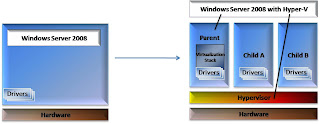
What was a normal install of WS08 is now transformed into more of a VM itself (we call it the Parent). And like Parents everywhere it has a role in life - to protect, care for, and sacrifice for its children (the VMs in this case).


This is best described through a graphic. In the picture below the left shows a 'standard' Windows server, the arrow represents the process of installing the Hyper-V role, and the right represents the new architecture that the server is converted into.


After this transformation your Windows Server 2008 server is now architected totally differently - it is fundamentally a VM itself. If you are familiar with other hypervisors (ESX server, XenSource, VirtualIron, Xen, etc) it is a similar model. In many of those cases you would not consider installing an email server or an LDAP service into that Parent partition - those servers are seen to have a definite and dedicated role in life.


This perception is further complicated by the interface that Hyper-V has. It is a nice, friendly Windows server GUI - just like we know and love. We can perform functions using the Hyper-V manager, but we can also work with the underlying OS, manually manipulating the network connections, disk management, etc.


Now, Hyper-V capitalizes on this by using other Windows services to its advantage.


Do you want to set up two Hyper-V servers for high availability? Set them up in a traditional Windows cluster configuration and make each VM that you want highly available the clustered "application" (it is here that I begin to talk about a VM as a workload - in this configuration the VM is no different than an application).


Do you want to set up role based permissions? Set up Authorization Manager.


These two things are not specific or unique to Hyper-V but they are used as a component of your environment / deployment.


I hope that I was at least successful in starting you thinking and asking questions regarding this new way of looking at a Windows server.